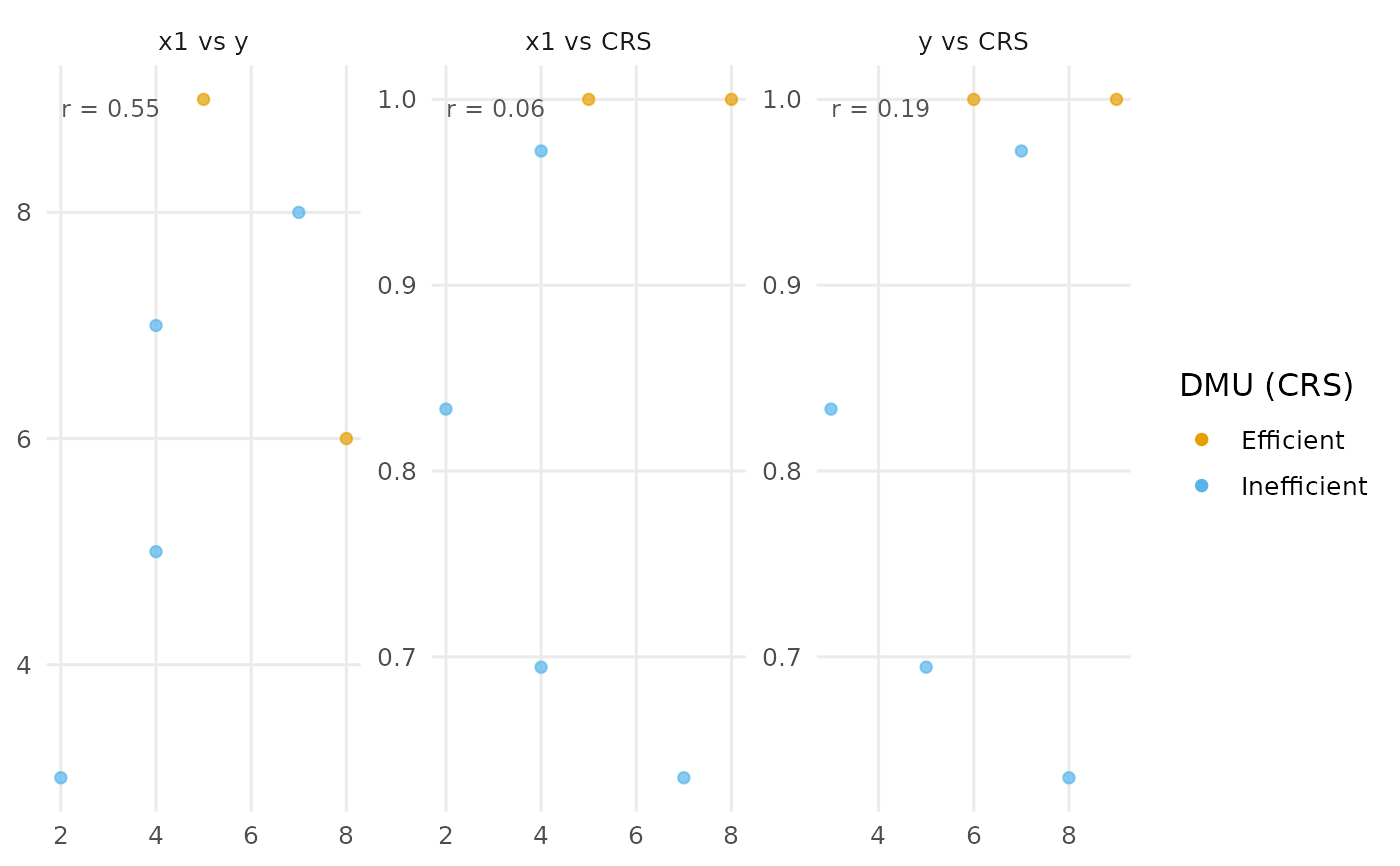
Pairwise scatter plots of inputs, outputs and efficiency scores
Source:R/plot-io-scatter.R
plot_io_scatter.RdBuilds the pairwise scatter plots of a chosen set of columns: any subset of
the inputs and outputs, plus optionally one or more efficiency scores. For
k selected columns it draws all choose(k, 2) pairwise panels.
For example, selecting one input, one output and the CRS score gives three
panels.
Usage
plot_io_scatter(
  x,
  vars = NULL,
  efficiency = NULL,
  color = c("crs", "vrs", "drs", "irs", "fdh", "add", "none"),
  correlation = TRUE,
  orientation = "in",
  labels = "none",
  max.overlaps.value = 10,
  transparency = 0.7,
  fade = TRUE,
  subtitle = NULL,
  title = NULL,
  interactive = FALSE,
  ...
)
Arguments
- x
A
dea_dataobject, or a data frame coerced byas_dea_data.- vars
Character vector of input/output column names to include. Defaults to all inputs and outputs.
- efficiency
Optional character vector of efficiency models to compute and include as columns, any of
"crs","vrs","drs","irs","fdh","add".- color
Efficiency model used to colour points by efficient/inefficient status: one of
"crs"(default),"vrs","drs","irs","fdh","add", or"none".- correlation
Logical; if
TRUE(default) the Pearson correlation is printed in the top-left corner of each panel.- orientation
Measurement orientation used when computing efficiency scores.
- labels
Which DMUs to label:
"none"(default),"all","max.overlaps", or the name/id of a single DMU to highlight it. (Usesgeom_textwith overlap-thinning rather than ggrepel, since repel is unsafe inside facets.)- max.overlaps.value
Accepted for API consistency; unused here (default
10).- transparency
Point alpha in
[0, 1](default0.7).- fade
Controls the single-DMU focus view. When one DMU is given to
labels, all other marks (and, for the network plots, everything outside that DMU's sub-network; for the panel biplot, the other trajectories) are faded so the chosen DMU stands out.TRUE(default) uses a sensible fade level;FALSEdisables it; a single number in[0, 1]sets the alpha of the faded marks directly, where larger values fade them less (e.g.0.4leaves them more visible).- subtitle
Optional subtitle shown beneath the title.
- title
Optional plot title.
- interactive
Logical; static ggplot2 (default) or interactive plotly.
- ...
Additional arguments passed to
geom_point.